Catching Hackers with a Honeypot - Installation

We have always been told that in cybersecurity, attackers are always one step ahead. They will use vulnerabilities and/or techniques that defenders know nothing about.
Thus, to reduce this gap, defenders have found a method that allows them to both protect themselves and understand the new techniques used by attackers. This method is called a honeypot.
A honeypot is a system, intentionally left vulnerable and easily accessible by attackers. The objective is to collect IOCs (Indicators of Compromise) and IOAs (Indicators of Attack) to understand the techniques used by attackers.
In this article, we will discuss the deployment of the Tpot solution created by Deutsche Telekom:

This solution provides a "turnkey" honeypot with different "sensors" that rely on various services to collect maximum data.
Prerequisites
On the GitHub page, Tpot CE mentions the following prerequisites for a "hive" (sensors + log analyzer):
- RAM: 16GB
- Storage: 256GB
- Ubuntu 24.04 LTS or any other supported distribution (see https://github.com/telekom-security/tpotce?tab=readme-ov-file#choose-your-distro)
- An unfiltered internet connection
I personally chose the following configuration:
- Host: DigitalOcean
- Distribution: Ubuntu 24.10
- CPU: 4vCPU
- Storage: 160GB
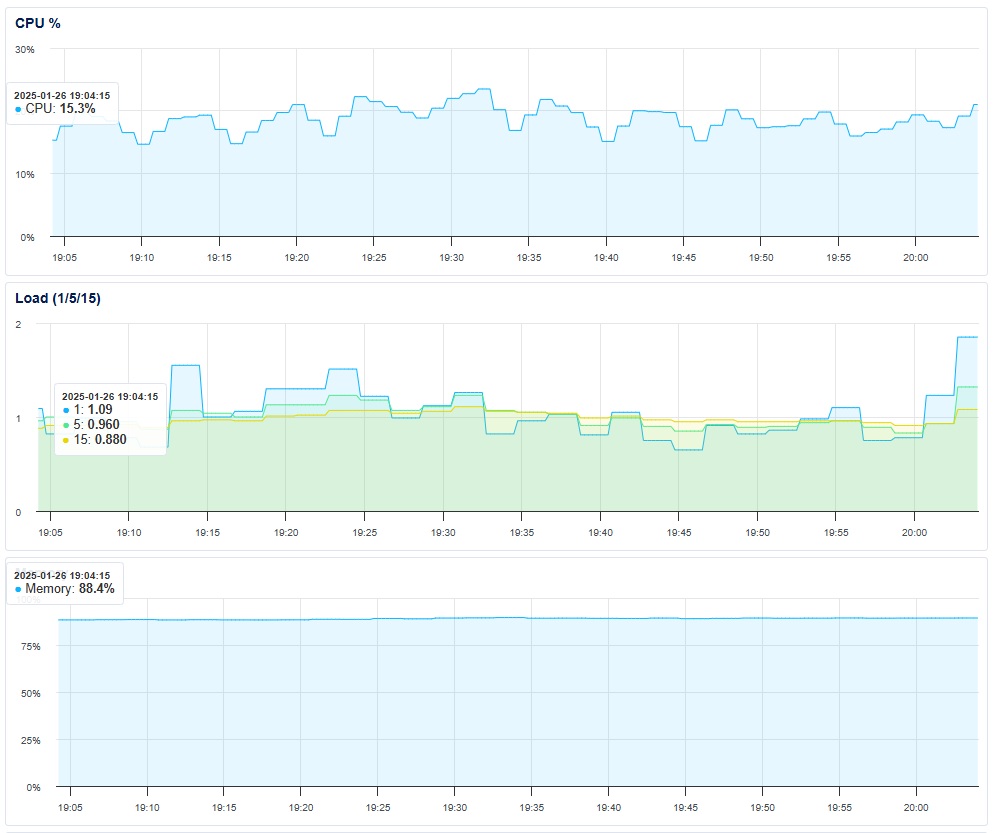
So in summary, I do not meet the prerequisites... However, it works quite well:
Installation
Once you have a clean installation of your distribution, create a new user and add them to the sudo group:
adduser hpot
usermod -aG sudo hpot
The "tpot" user is created by the tpot installer, so do not use this username.
Then, log in with this user and launch the installation:
su hpot
cd ~
env bash -c "$(curl -sL https://github.com/telekom-security/tpotce/raw/master/install.sh)"
Follow the installer's instructions. At some point, it will offer you a choice of services (honeypots) you want to use. Choose the ones that suit you from the following table:
Summary Table
| Port | Protocol | Direction | Description | Services Emulated | Summary Description | GitHub Link |
|---|---|---|---|---|---|---|
| 80, 443 | tcp | outgoing | T-Pot Management: Install, Updates, Logs (i.e. OS, GitHub, DockerHub, Sicherheitstacho, etc.) | T-Pot Management | T-Pot management platform | T-Pot GitHub |
| 11434 | tcp | outgoing | LLM based honeypots: Access your Ollama installation | Language Models (LLM) | LLM-based honeypot to interact with Ollama | Ollama GitHub |
| 64294 | tcp | incoming | T-Pot Management: Sensor data transmission to hive (through NGINX reverse proxy) to 127.0.0.1:64305 | Data Transmission | Transmits sensor data to T-Pot hive | T-Pot GitHub |
| 64295 | tcp | incoming | T-Pot Management: Access to SSH | SSH | SSH access for T-Pot management | T-Pot GitHub |
| 64297 | tcp | incoming | T-Pot Management: Access to NGINX reverse proxy | NGINX | NGINX reverse proxy access for T-Pot | T-Pot GitHub |
| 5555 | tcp | incoming | Honeypot: ADBHoney | Android Debug Bridge (ADB) | Emulates ADB service to capture attacks on Android devices | ADBHoney GitHub |
| 22 | tcp | incoming | Honeypot: Beelzebub (LLM required) | SSH | SSH honeypot with language model integration | Beelzebub GitHub |
| 5000 | udp | incoming | Honeypot: CiscoASA | Cisco ASA (VPN) | Emulates Cisco ASA VPN service to capture attacks | CiscoASA GitHub |
| 8443 | tcp | incoming | Honeypot: CiscoASA | Cisco ASA (HTTPS) | Emulates Cisco ASA HTTPS service to capture attacks | CiscoASA GitHub |
| 443 | tcp | incoming | Honeypot: CitrixHoneypot | Citrix (HTTPS) | Emulates Citrix service to capture attacks on Citrix servers | CitrixHoneypot GitHub |
| 80, 102, 502, 1025, 2404, 10001, 44818, 47808, 50100 | tcp | incoming | Honeypot: Conpot | ICS/SCADA (Industrial Automation) | Emulates industrial systems (ICS/SCADA) to capture attacks | Conpot GitHub |
| 161, 623 | udp | incoming | Honeypot: Conpot | SNMP, IPMI | Emulates SNMP and IPMI protocols to capture attacks | Conpot GitHub |
| 22, 23 | tcp | incoming | Honeypot: Cowrie | SSH, Telnet | Emulates SSH and Telnet services to capture attacks | Cowrie GitHub |
| 19, 53, 123, 1900 | udp | incoming | Honeypot: Ddospot | Chargen, DNS, NTP, SSDP | Emulates vulnerable services to capture DDoS attacks | Ddospot GitHub |
| 11112 | tcp | incoming | Honeypot: Dicompot | DICOM (Medical Imaging) | Emulates DICOM service to capture attacks on medical systems | Dicompot GitHub |
| 21, 42, 135, 443, 445, 1433, 1723, 1883, 3306, 8081 | tcp | incoming | Honeypot: Dionaea | FTP, SMB, HTTP, SQL, etc. | Emulates multiple services to capture attacks on various protocols | Dionaea GitHub |
| 69 | udp | incoming | Honeypot: Dionaea | TFTP | Emulates TFTP service to capture attacks | Dionaea GitHub |
| 9200 | tcp | incoming | Honeypot: Elasticpot | Elasticsearch | Emulates Elasticsearch service to capture attacks | Elasticpot GitHub |
| 22 | tcp | incoming | Honeypot: Endlessh | SSH | Emulates SSH service to capture attacks with endless connection | Endlessh GitHub |
| 80, 443, 8080, 8443 | tcp | incoming | Honeypot: Galah (LLM required) | HTTP, HTTPS | HTTP/HTTPS honeypot with language model integration | Galah GitHub |
| 8080 | tcp | incoming | Honeypot: Go-pot | HTTP | Emulates HTTP service to capture attacks | Go-pot GitHub |
| 80, 443 | tcp | incoming | Honeypot: H0neytr4p | HTTP, HTTPS | Emulates HTTP/HTTPS services to capture attacks | H0neytr4p GitHub |
| 21, 22, 23, 25, 80, 110, 143, 443, 993, 995, 1080, 5432, 5900 | tcp | incoming | Honeypot: Heralding | FTP, SSH, Telnet, SMTP, HTTP, etc. | Emulates multiple services to capture attacks on various protocols | Heralding GitHub |
| 3000 | tcp | incoming | Honeypot: Honeyaml | HTTP | Emulates HTTP service to capture attacks with YAML files | Honeyaml GitHub |
| 21, 22, 23, 25, 80, 110, 143, 389, 443, 445, 631, 1080, 1433, 1521, 3306, 3389, 5060, 5432, 5900, 6379, 6667, 8080, 9100, 9200, 11211 | tcp | incoming | Honeypot: qHoneypots | FTP, SSH, Telnet, SMTP, HTTP, LDAP, etc. | Emulates a wide range of services to capture attacks | qHoneypots GitHub |
| 53, 123, 161, 5060 | udp | incoming | Honeypot: qHoneypots | DNS, NTP, SNMP, SIP | Emulates UDP services to capture attacks | qHoneypots GitHub |
| 631 | tcp | incoming | Honeypot: IPPHoney | IPP (Printing) | Emulates IPP service to capture attacks on printers | IPPHoney GitHub |
| 80, 443, 8080, 9200, 25565 | tcp | incoming | Honeypot: Log4Pot | HTTP, HTTPS, Elasticsearch, Minecraft | Emulates services vulnerable to Log4Shell | Log4Pot GitHub |
| 25 | tcp | incoming | Honeypot: Mailoney | SMTP | Emulates SMTP service to capture attacks on mail servers | Mailoney GitHub |
| 2575 | tcp | incoming | Honeypot: Medpot | DICOM (Medical Imaging) | Emulates DICOM service to capture attacks on medical systems | Medpot GitHub |
| 9100 | tcp | incoming | Honeypot: Miniprint | Printing | Emulates printing service to capture attacks | Miniprint GitHub |
| 6379 | tcp | incoming | Honeypot: Redishoneypot | Redis | Emulates Redis service to capture attacks | Redishoneypot GitHub |
| 5060 | tcp/udp | incoming | Honeypot: SentryPeer | SIP | Emulates SIP service to capture attacks on VoIP systems | SentryPeer GitHub |
| 80 | tcp | incoming | Honeypot: Snare (Tanner) | HTTP | Emulates HTTP service to capture attacks with advanced interactions | Snare GitHub |
| 8090 | tcp | incoming | Honeypot: Wordpot | HTTP | Emulates HTTP service to capture attacks on WordPress blogs | Wordpot GitHub |
Once the installation is complete, if you were connected via SSH to your VM, you may lose the connection since a honeypot has taken your place.
Here are the new ports that will allow you to connect:
- SSH: 64295
- NGINX: 64297
It is recommended to either:
- Implement a VPN to access these 2 ports only from your machine, but this will use more resources.
- Whitelist your IP via a firewall (UFW, iptables, etc.)
Getting Started
Once connected to your VM, you can access the Tpot web interface via port 64294:

You then have access to several services:
- Attack map: Map of ongoing attacks
- Cyberchef: Tool to decode data
- Elasticvue: Node/cluster management
- Kibana: Dashboards + log visualization
- Spiderfoot: Reconnaissance tool
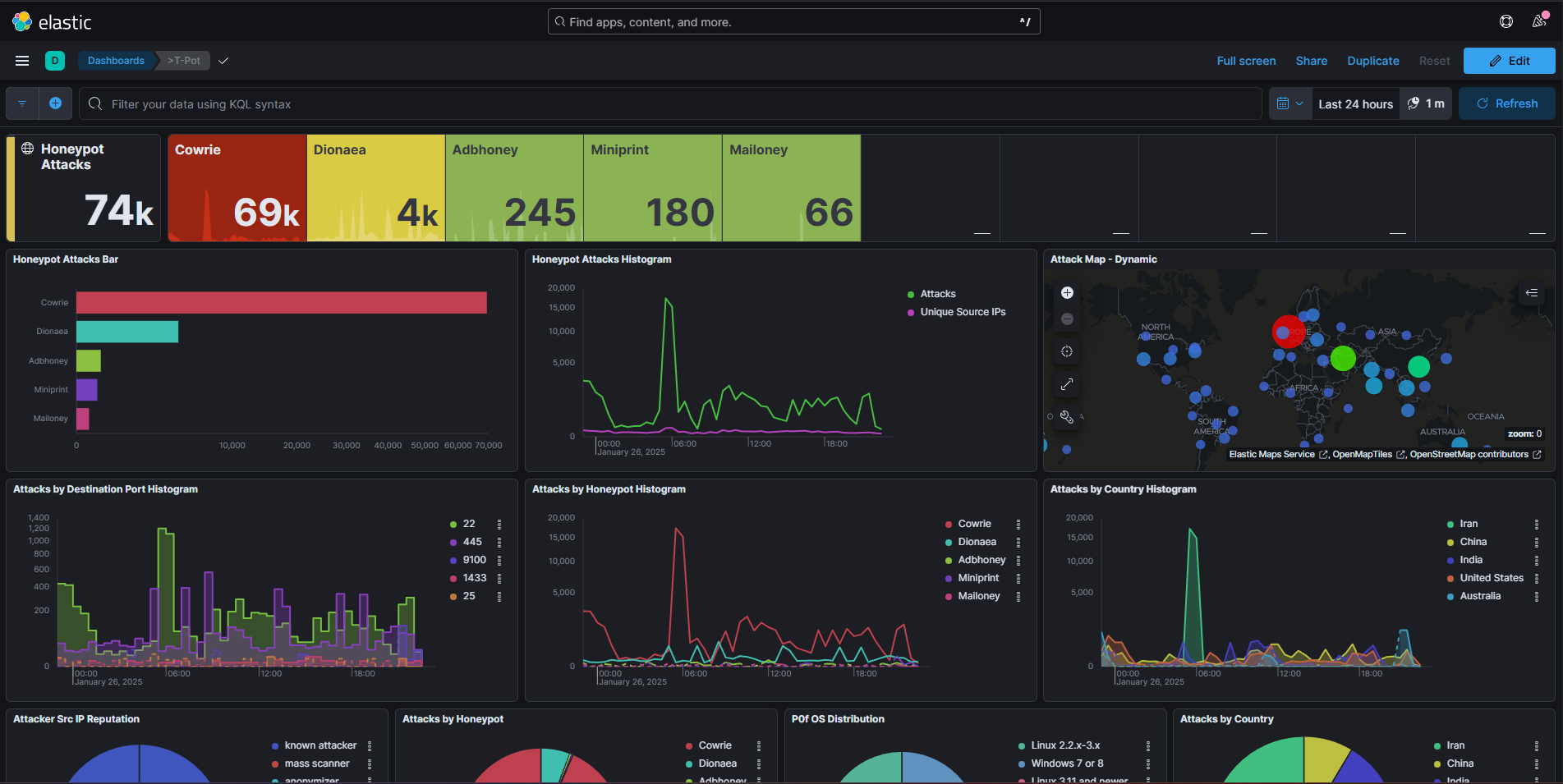
What will interest us initially is the Kibana service. We have a general dashboard as the home page:
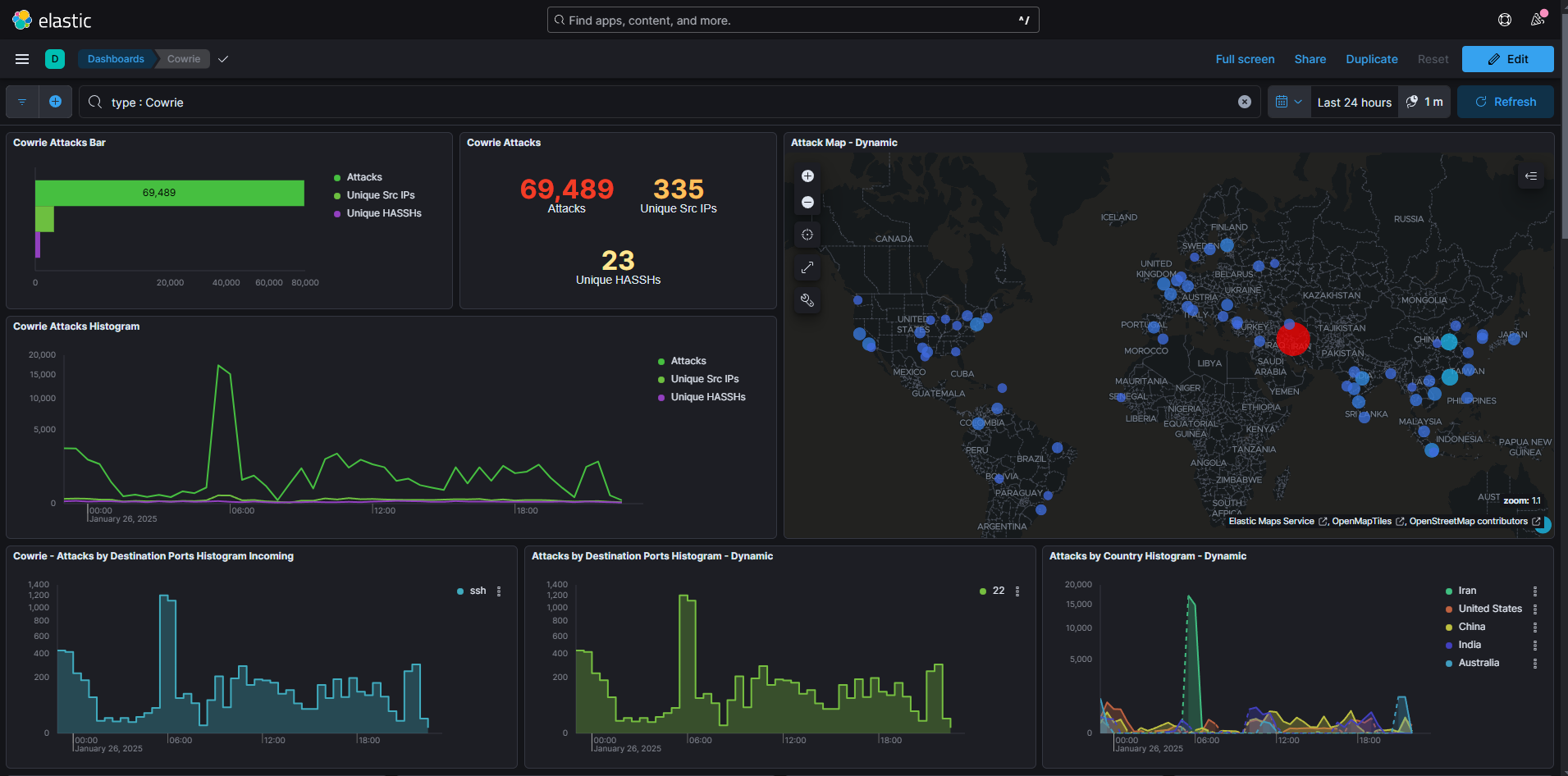
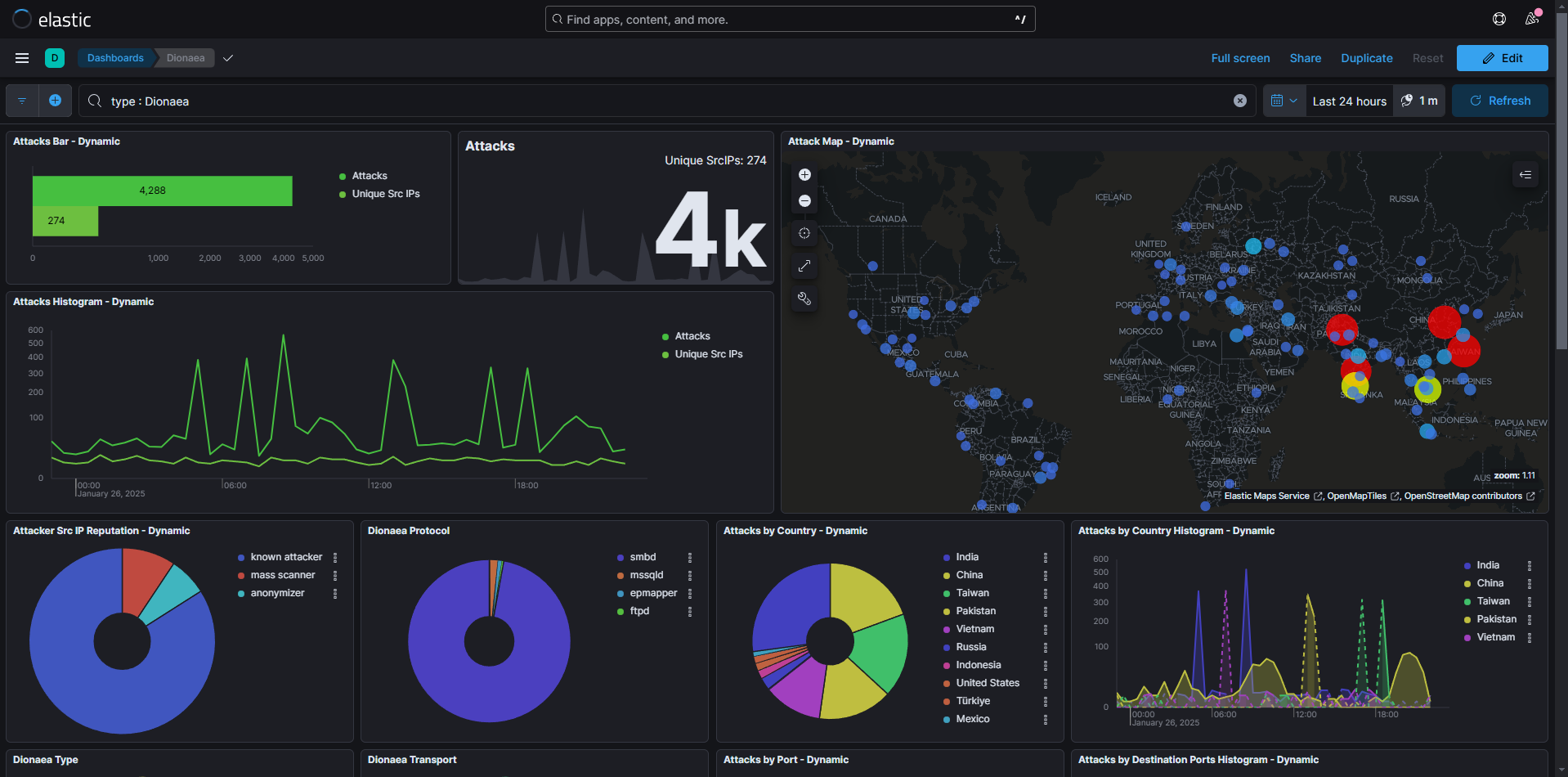
There is also a dashboard for each honeypot, allowing you to see ongoing attacks, attacker IPs, payloads used, etc.
Here for example the dashboard of "Cowrie", an SSH honeypot:
Or here the dashboard of "Dionaea", a multi-protocol honeypot:
We can then look at logs from our different honeypots. To do this, go to the "Discover" tab:
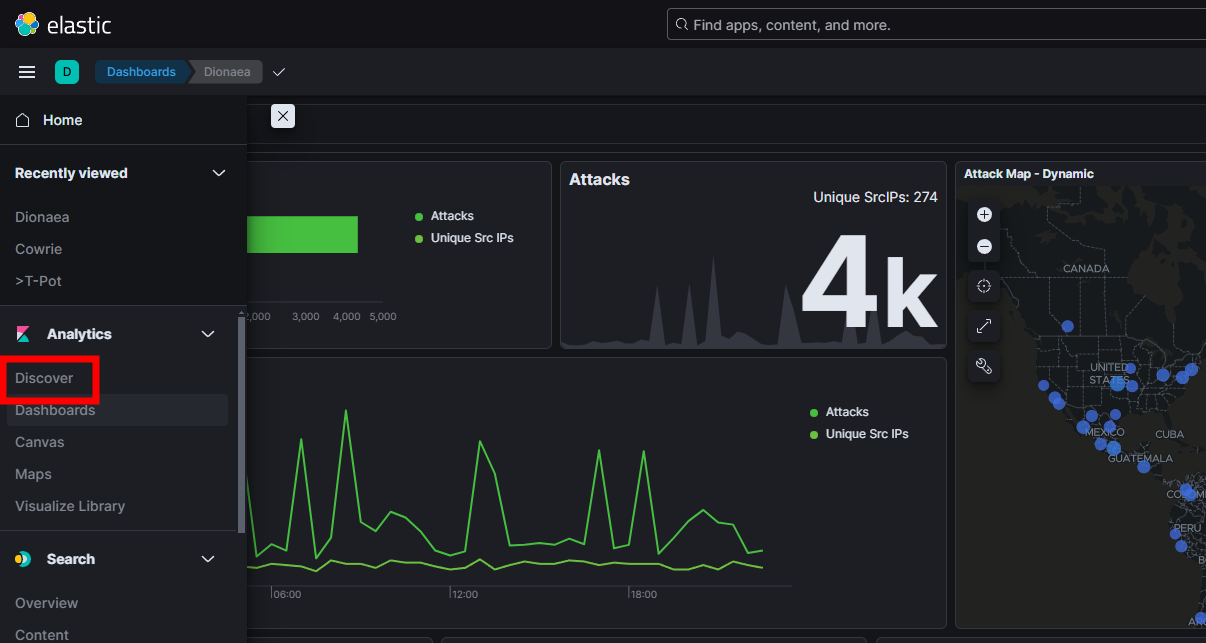
You can then see logs in real-time, and filter them by honeypot, IP, payload, etc:
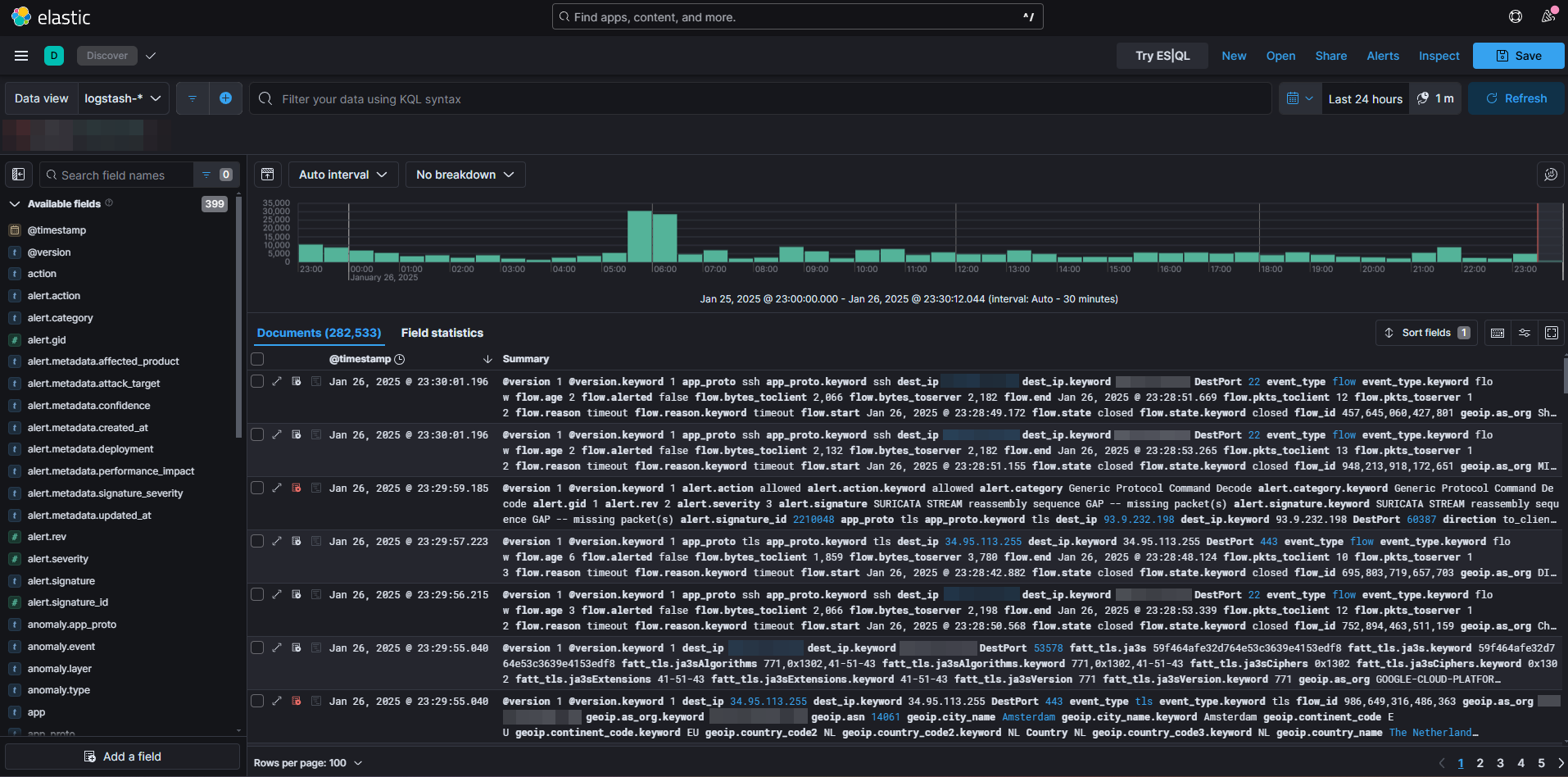
We can then filter and select these logs with KQL (Kibana Query Language) to export and analyze them. But that will be explained in part 2!